
Install the app
How to install the app on iOS
Follow along with the video below to see how to install our site as a web app on your home screen.
Note: This feature may not be available in some browsers.
Latest on MJJC
You are using an out of date browser. It may not display this or other websites correctly.
You should upgrade or use an alternative browser.
You should upgrade or use an alternative browser.
Is there a way to prevent the chat alert sound?
- Thread starter Maxym
- Start date
- Status
- Not open for further replies.


There is...
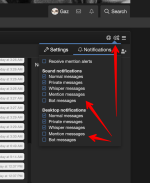
Go into the chat room - https://www.mjjcommunity.com/chat click on the cog in the top right corner and choose 'notifications' then decide which you want on and off.
Go into the chat room - https://www.mjjcommunity.com/chat click on the cog in the top right corner and choose 'notifications' then decide which you want on and off.
Attachments
Are you on the phone or computer?Thanks, well I don't see the cog, I see the other two icon surrounding it but we probably don't have access to the cog.
k... lemme look in setting to see if there is one for sounds I need to add to general members.Computer.

Michaels Lover
Premium Member

I would like to be able to turn off that sound as well. Isn't there a way to do it?
Mikky Dee
Sunset Driver, Midnight Rider
- Joined
- Mar 8, 2016
- Messages
- 2,905
- Points
- 63
I just have my sound system turned off, when I am on this forum, to avoid the problem (I use a desk top computer, most of the time), BUT the Chat room bar at the bottom of the page still flashes incessantly. It's truly annoying - a good thing I don't have epilepsy, or it would probably give me a seizure.I would like to be able to turn off that sound as well. Isn't there a way to do it?

Mikky Dee
Sunset Driver, Midnight Rider
- Joined
- Mar 8, 2016
- Messages
- 2,905
- Points
- 63
Are there any updates on this?k... lemme look in setting to see if there is one for sounds I need to add to general members.
I am a bit lost where you seem to think there is some sort of 'Flashing' ie a bright strobe type of light which affects the epileptic when there is nothing of the sort, please explain?I just have my sound system turned off, when I am on this forum, to avoid the problem (I use a desk top computer, most of the time), BUT the Chat room bar at the bottom of the page still flashes incessantly. It's truly annoying - a good thing I don't have epilepsy, or it would probably give me a seizure.
Mikky Dee
Sunset Driver, Midnight Rider
- Joined
- Mar 8, 2016
- Messages
- 2,905
- Points
- 63
Check out this video and you'll see what I mean about the flashing. I was only 50% serious about epilepsy; however I'm fairly sure there are other triggers for that, besides just strobe lighting. I know a few people who live with epilepsy and their seizures are brought on by a myriad of things.
Last edited:
Mikky Dee
Sunset Driver, Midnight Rider
- Joined
- Mar 8, 2016
- Messages
- 2,905
- Points
- 63
Oh.It’s notifying you that you have a private message in the chat room. Go and read it and the blinking will stop lol
LMAO.
 Lol
Lol
Michaels Lover
Premium Member
Perhaps mute the tab you have open in your browser that's what I do.@Gaz is there really nothing you can do to add a mute button for the chat alert sound, or something?
Michaels Lover
Premium Member
The browsers on my tablet doesn't have that optionPerhaps mute the tab you have open in your browser that's what I do.
MikeHuston
Proud Member
- Joined
- Mar 20, 2023
- Messages
- 6
- Points
- 1
If you are using a web browser, you can usually prevent the chat alert sound by muting the tab in which the chat is open.
To do this, simply right-click on the tab and select "Mute Tab" (this option may appear slightly differently depending on the web browser you are using). This will prevent any audio from the tab from playing, including chat alerts.
To do this, simply right-click on the tab and select "Mute Tab" (this option may appear slightly differently depending on the web browser you are using). This will prevent any audio from the tab from playing, including chat alerts.
If you are using a web browser, you can usually prevent the chat alert sound by muting the tab in which the chat is open.
To do this, simply right-click on the tab and select "Mute Tab" (this option may appear slightly differently depending on the web browser you are using). This will prevent any audio from the tab from playing, including chat alerts.
Already discussed, and they mentionned that they use mobile device.
Are you one of those call center bots that always has approximate unrelated and non-working solutions to every problem?
Edit: That was about the latest replies, and regard me since I create this thread, yes I muted the forum and I need unmuted tab each time I want to hear a video from the forum, however, that is still not the ideal way for things to work.
Last edited:
- Status
- Not open for further replies.