Screen Settings

barbee0715

Proud Member
Joined
Sep 9, 2012
Messages
6,940
Points
63
Location
Texas, USA
Hi-I'm logged in on my desktop and I see the screen settings are all changed and it's really lovely-but I can't fit it on my monitor-is there a way to go to settings and set it back to the old version?
Thank you!!
(I looked and it only gave me 2 choices 3.0 version and mobile version)
 
It's called overhall of MJJC, look/feel etc post a screen shot here for me to make adjustments?
 
I just want to go back to my old settings? I can't access the activity stream page either?
 
I'm lost, you can't click on "what's new" and get the below no? I can and can see the activity stream??

007.jpg
 
I'm trying to get a screen shot of just the first page-so you can see that I can't read anything to the right-like the Twitter, Facebook, the rest of sentences, but it's not letting me do it.
It's alt print screen and then just paste over, right?
 
I'm trying to get a screen shot of just the first page-so you can see that I can't read anything to the right-like the Twitter, Facebook, the rest of sentences, but it's not letting me do it.
It's alt print screen and then just paste over, right?

I still can't do it. not sure why
 
I'm trying to get a screen shot of just the first page-so you can see that I can't read anything to the right-like the Twitter, Facebook, the rest of sentences, but it's not letting me do it.
It's alt print screen and then just paste over, right?

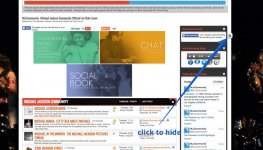
Ok yeah please let me see, although I'm not sure what twitter facebook etc has got to do with the new look forum, those elements are what I call widgets and can be switched off. like below.

008.jpg

009.jpg
 
OK-that helps-I got it saved as a document-I just couldn't save it as a picture. If you open up a thread to read-I have to keep going back and forth left to right to left to read the whole thing-it's just making it a little hard to read-

(it's pretty, tho)

For example, I click on New Posts and the entire last column-what forum it's in, is cut off-maybe I can just reduce the screen to 75% or something.

Sorry, I meant new posts-I'm seriously trying to get a picture to show you what I'm talking about-I may have to give it up for tonight, though. It just refuses to copy over for me. :(
 
Last edited:
OK-that helps-I got it saved as a document-I just couldn't save it as a picture. If you open up a thread to read-I have to keep going back and forth left to right to left to read the whole thing-it's just making it a little hard to read-

(it's pretty, tho)

ok your losing me now, the functionality of the forum is no different, what I have done is revamp the look, the images the colours etc.
 
I don't know how to put my Mac screenshot from my desktop on here for Gaz to see?
 
Last edited:
I don't know how to put my Mac screenshot from my desktop on here for Gaz to see?

The new layout is a heck of a lot more simplistic in design (as in old school) but hard to navigate...

You'll soon get used to it my friend :)
 
Oh and I will be doing bit's and bobs to ease it along the way ;)
 
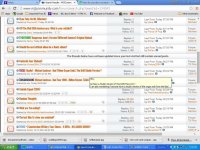
^^^i got it!!!!!!!!!!!!!!!!!!!!! got a picture of the new posts screen-the right side is cut off. Each post is like that, if it's long-
 
Last edited:
Oh and I will be doing bit's and bobs to ease it along the way ;)

I'm cool with whatever as long as we have a darker option. I had mine set to Billie Jean or whatever and it was black and sleek. The bright colours make me blind :p
 
I don't know how to put my Mac screenshot from my desktop on here for Gaz to see?

Shift-Command-3 takes a screenshot of your whole Mac screen. It'll appear on your desktop, which you can upload to www.imgur.com.

It'll give you a 'direct link' on the right side of the screen once it's uploaded, copy that link. When writing a post here, just click on the image button in the toolbar and paste that link in there :)
 
I don't know how to put my Mac screenshot from my desktop on here for Gaz to see?

You click the INSERT IMAGE button and you can upload the pic from your computer...
or upload elsewhere and post it like any other picture.
 
My next addition to the look and feel will be a dark one (y)
 
I'm cool with whatever as long as we have a darker option. I had mine set to Billie Jean or whatever and it was black and sleek. The bright colours make me blind :p

I second that request. My eyes are really very sensitive.
 
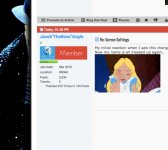
My initial reaction when I saw this change.
Now my name is all meseed up again..
trs.gif
 
You sure??

001.jpg

Looks ok to me.
 
lol okayyyy!!!!

Not easy pleasin' the masses, eh Gaz? lol I liked the graphic yesterday also, but this one with the BJ poses in the background is even cooler.
 
What happened to the notifications at the bottom of posts when users thanked them?
 
I second that request. My eyes are really very sensitive.
I've had glaucoma since I was 29, so that might be making a difference.
What size desk top monitor should I get for the new format. I need to get one anyway. :)
 
You see this little dot, which shows whether Im online or not. It loooks disturbing..

Oh my God, now I can't stop staring at your damn dot. Damn it, Jacob! :rofl:

I've had glaucoma since I was 29, so that might be making a difference.

Oh, that is very unpleasant. :better:

Gaz, perhaps you can make widescreen and whatever the other version is of the themes? Like we had before. I think that might be barbee's problem. :)
 
Back
Top